
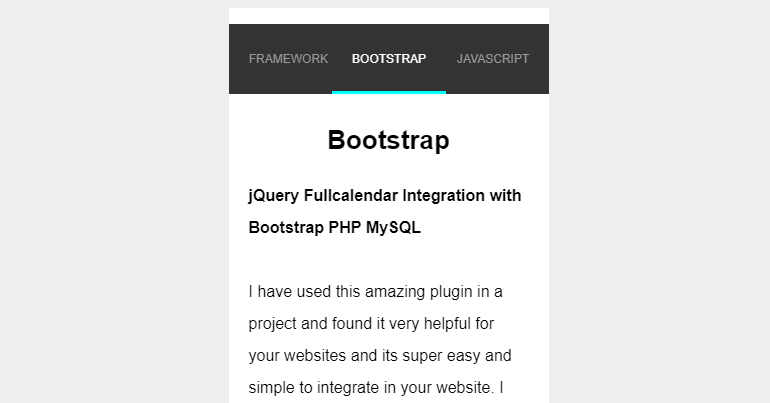

I have found a good mobile based swipe tab here and really loved it so now I am sharing it with you. Its very simple and very useful tutorial you can use these tabs in your mobile based website or hybrid mobile apps.
[wpdm_file id=3]
index.html file contain all the tabs scripting:
<div class="swipegory">

  <nav>

    <ul>

      <li><a href="#item1">PHPLift</a></li>

      <li><a href="#item2">FRAMEWORK</a></li>

      <li><a href="#item3">BOOTSTRAP</a></li>

      <li><a href="#item4">JAVASCRIPT</a></li>

      <li><a href="#item5">CSS 3</a></li>

      <li><a href="#item6">HTML 5</a></li>

      <li><a href="#item7">PHP</a></li>

    </ul>

  </nav>

  <ul class="panes">

    <li>

      <h1>PHPLift</h1>

      <p><b>Create fly to cart / basket effect for eCommerce using jQuery and CSS</b></p>

      <p><img src="https://phplift.net/wp-content/uploads/2018/06/Create-fly-to-cart-basket-effect-for-eCommerce-using-jQuery-and-CSS-265x160.png"  /></p>

    </li>

    <li>

        <h1>Frameworks</h1>

        <p><b>8 Best PHP Frameworks Of 2017 For Developers</b><br><br>Most of the developers found PHP is the right developing language which works perfectly from server-side. Using such type of scripting languages has been boomed since the interdiction of inline code in static HTML.</p>

    </li>

    <li>

        <h1>Bootstrap</h1>

        <p><b>jQuery Fullcalendar Integration with Bootstrap PHP MySQL</b><br><br>I have used this amazing plugin in a project and found it very helpful for your websites and its super easy and simple to integrate in your website. I have used bootstrap With PHP & MySQL very simple and easy steps.</p></li>

    <li>

        <h1>JavaScript</h1>

        <p><b>Useful JavaScript globals</b><br><br><img src="https://phplift.net/wp-content/uploads/2017/03/JavaScript-tips-and-tricks-265x160.png"  /></p>

    <li>

        <h1>CSS 3</h1>

        <p><b>Cool CSS3 features</b><br><br><img src="https://phplift.net/wp-content/uploads/2017/03/Cool-CSS3-features-265x160.png"  /></p>

    </li>

    <li>

        <h1>HTML 5</h1>

        <p><b>Cool HTML5 features</b><br><br>You can be more specific, for example, by stipulating image/png instead of the wildcard image/* which accepts all kinds of images. When you add the accept attribute and the user is shown the file dialog, he would be able to select only files from.</p>

    </li>

    <li>

        <h1>PHP</h1>

        <p><b>Passing input parameters in PHP</b><br><br><img src="https://phplift.net/wp-content/uploads/2017/03/Passing-input-parameters-in-PHP-265x160.png" /></p>

    </li>

  </ul>

</div>
script.js
var autoAdjustHeight = true;


// update on click

$('nav a').on('mousedown', function(e){

  e.preventDefault();

  var goTo = $(this).parent().index();

  swipegoryUpdate(goTo);

});


// update on touch

$("ul.panes").swipe({

  swipeStatus:function(event, phase, direction, distance, duration, fingerCount) {

    var translateString = 'translate3d(0px, 0px, 0px)';

    var transitionDuration = $('nav li.cur').css('transitionDuration');

    var speed = transitionDuration;


    if(phase == 'move') {

      speed = '0ms';

      if(direction == 'left') {

        translateString = 'translate3d(-' + distance + 'px, 0px, 0px)';

        $('.panes li.cur').css('marginLeft', '-'+ distance +'px');

      }

      else if(direction == 'right') {

        translateString = 'translate3d(' + distance + 'px, 0px, 0px)';

        $('.panes li.cur').css('marginLeft', distance +'px');

      }

      $('nav li.cur').css({

        transitionDuration: speed,

        transform: translateString

      });


    }

    else if (phase == 'end') {

      // reset transform3D

      var marginLeft = $('nav li.cur').css('marginLeft');

      $('nav li.cur').attr('style', '').css('marginLeft', marginLeft);

      $('.panes li.cur').attr('style', '');

    }

  },

  swipeLeft:function(event, direction, distance, duration, fingerCount) {

    //This only fires when the user swipes left

    var goTo = $('nav li.cur').index();

    goTo++;

    swipegoryUpdate(goTo);

  },

  swipeRight:function(event, direction, distance, duration, fingerCount) {

    //This only fires when the user swipes left

    var goTo = $('nav li.cur').index();

    goTo--;

    swipegoryUpdate(goTo);

  },

  threshold: 50,

  triggerOnTouchEnd: false,

  allowPageScroll: "vertical",

  excludedElements: "button, input, select, textarea, .noSwipe"

});


// update on load

$(window).load(function() {

  swipegoryUpdate(0);

});


function swipegoryUpdate(goTo) {

  var listItems = $('nav li');

  var panes = $('.panes');

  var prev = goTo - 1;

  var next = goTo + 1;

  if(goTo >= 0 && goTo < listItems.length) {

    listItems.removeClass('prev').removeClass('cur').removeClass('next').removeClass('before').removeClass('after');

    $('li', panes).removeClass('prev').removeClass('cur').removeClass('next').removeClass('before').removeClass('after');


    listItems.each(function(i) {

      var li = $(this);

      var pane = $('li:eq('+i+')', panes);


      li.attr('style', '');


      if(i == prev) {

        li.addClass('prev');

        li.css('margin-left', '0');

        pane.addClass('prev');

      }

      else if(i == next) {

        li.addClass('next');

        li.css('margin-left', '-' + li.outerWidth() + 'px');

        pane.addClass('next');

      }

      else if(i < goTo) {

        li.addClass('before');

        li.css('margin-left', '-' + li.outerWidth() + 'px');

        pane.addClass('before');

      }

      else if(i == goTo) {

        li.addClass('cur');

        var marginLeft = li.outerWidth() / 2;


        li.css('margin-left', '-' + marginLeft + 'px');

        pane.addClass('cur');


        if(autoAdjustHeight == true) {

          $('.swipegory').css('height', pane.outerHeight() + li.outerHeight());

        }


      }

      else if(i > goTo) {

        li.addClass('after');

        li.css('margin-left', '0');

        pane.addClass('after');

      }

    });

  }

}
style.css
* {

  box-sizing: border-box;

}

html,

body {

  height: 100%;

}

body {

  padding: 0;

  background: #eee;

  font: 16px/2em 'Montserrat', sans-serif;

}

img {

  max-width: 150px;

  heigth: auto;

  display: block;

  margin: 0 auto;

}

h1 {

  text-align: center;

  font-size: 26px;

  margin: 10px 0 20px 0;

}

p {

  margin: 0 0 20px 0;

}

p.footer {

  font-size: 12px;

  text-align: center;

}

.swipegory {

  position: relative;

  max-width: 320px;

  height: 480px;

  margin: 0 auto;

  background: #fff;

  padding-top: 70px;

  overflow: hidden;

  transition: 1s height;

  transform: translate3d(0, 0, 0);

  margin-bottom: 5px;

}

.swipegory nav ul {

  position: absolute;

  top: 0;

  left: 0;

  width: 100%;

  height: 70px;

  background: #333;

}

.swipegory nav li {

  position: absolute;

  top: 0;

  left: 100%;

  display: block;

  transition: 1s all;

  transform: translate3d(0, 0, 0);

  line-height: 70px;

  height: 70px;

  font-size: 12px;

  text-transform: uppercase;

}

.swipegory nav li.prev {

  left: 0;

}

.swipegory nav li.cur {

  left: 50%;

}

.swipegory nav li.cur a {

  color: #fff;

}

.swipegory nav li.cur a:after {

  opacity: 1;

  transform: translate3d(0, 0, 0);

}

.swipegory nav li.next {

  left: 100%;

}

.swipegory nav li.before {

  left: 0;

}

.swipegory nav li.after {

  left: 100%;

}

.swipegory nav li a {

  position: relative;

  color: #999;

  text-decoration: none;

  padding: 0 20px;

  height: 70px;

  line-height: 70px;

  display: block;

  overflow: hidden;

  transition: 1s color;

}

.swipegory nav li a:after {

  content: ' ';

  position: absolute;

  bottom: 0;

  left: 0;

  background: cyan;

  width: 100%;

  height: 3px;

  opacity: 0;

  transition: 1s all;

  transform: translate3d(0, 3px, 0);

}

.swipegory ul.panes {

  position: absolute;

  width: 100%;

  height: 100%;

  cursor: move;

}

.swipegory ul.panes li {

  position: absolute;

  top: 0;

  left: 100%;

  width: 100%;

  padding: 20px 20px 0 20px;

  transition: 1s all;

  transform: translate3d(0, 0, 0);

}

.swipegory ul.panes li.prev {

  transform: translate3d(-200%, 0, 0);

}

.swipegory ul.panes li.cur {

  transform: translate3d(-100%, 0, 0);

}

.swipegory ul.panes li.next {

  transform: translate3d(0, 0, 0);

}

.swipegory ul.panes li.before {

  transform: translate3d(-200%, 0, 0);

}

.swipegory ul.panes li.after {

  transform: translate3d(0, 0, 0);

}

@media all and (min-width: 320px) {

  body {

    padding: 20px 0;

  }

}
I hope you like it please feel free to ask question in below comments section.




Leave a Reply