
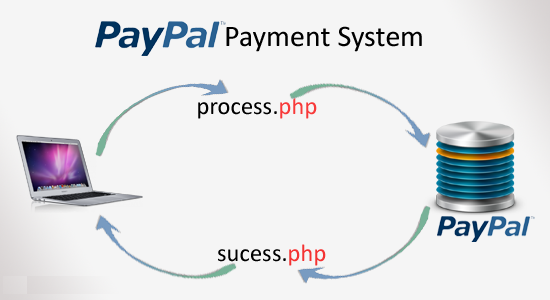

I received a tutorial requests from my reader that asked to me how to implement a payment gateway system with PayPal API. In this tutorial I want to explain how to work with Paypal Sandbox test accounts for payment system development and sending arguments while click buy now button. It’s simple and very easy to integrate into your web projects.
Create a Paypal Sandbox account at https://developer.paypal.com/
Step 2
Now create test accounts for payment system. Take a look at Sandbox menu left-side top Sandbox->Test Accounts
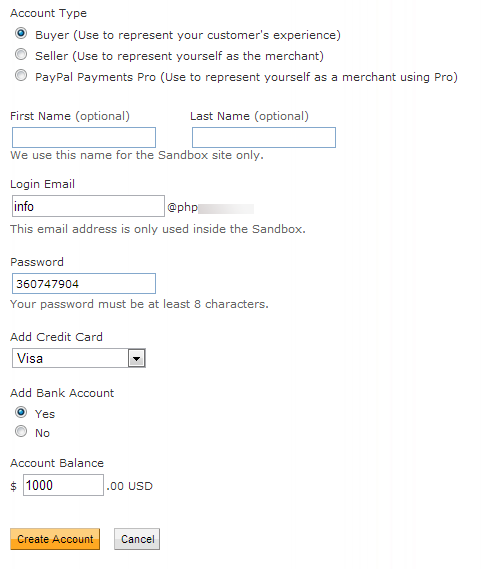
Step 3
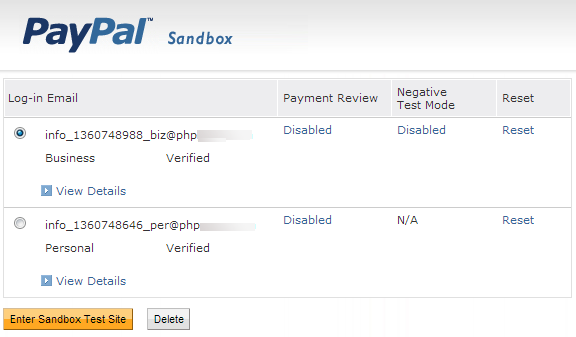
Here I have created two accounts Buyer (personal) and Seller (merchant/business)
index.php
Contains PHP code. Displaying products, product image, product name, and product price. Here you have to give your business(seller) $paypal_id id. Modify PayPal button form return and cancel_return URLs.
<?php

$paypal_url='https://www.sandbox.paypal.com/cgi-bin/webscr'; // Test Paypal API URL

$paypal_id='your_seller_id'; // Business email ID

?>

<h4>Welcome, Guest</h4>


<div class="product">

    <div class="image">

        <img src="https://phplift.net/wp-content/uploads/2017/01/logo.png" />

    </div>

    <div class="name">

        PHPGang Payment

    </div>

    <div class="price">

        Price:$10

    </div>

    <div class="btn">

    <form action="<?php echo $paypal_url; ?>" method="post" name="frmPayPal1">

    <input type="hidden" name="business" value="<?php echo $paypal_id; ?>">

    <input type="hidden" name="cmd" value="_xclick">

    <input type="hidden" name="item_name" value="PHPLift Payment">

    <input type="hidden" name="item_number" value="1">

    <input type="hidden" name="credits" value="510">

    <input type="hidden" name="userid" value="1">

    <input type="hidden" name="amount" value="10">

    <input type="hidden" name="cpp_header_image" value="https://phplift.net/wp-content/uploads/2017/01/logo.png">

    <input type="hidden" name="no_shipping" value="1">

    <input type="hidden" name="currency_code" value="USD">

    <input type="hidden" name="handling" value="0">

    <input type="hidden" name="cancel_return" value="https://demos.phplift.net/payment-with-paypal-using-phpcancel.php">

    <input type="hidden" name="return" value="https://demos.phplift.net/payment-with-paypal-using-php/success.php">

    <input type="image" src="https://www.sandbox.paypal.com/en_US/i/btn/btn_buynowCC_LG.gif" border="0" name="submit" alt="PayPal - The safer, easier way to pay online!">

    <img alt="" border="0" src="https://www.sandbox.paypal.com/en_US/i/scr/pixel.gif" width="1" height="1">

    </form>

    </div>

</div>
success.php
Paypal payment success return file. Getting Paypal argument like item_number. Paypal data success.php?tx=83437E384950D&st=Completed&amt=10.00&cc=USD&cm=&item_number=1
<?php

$item_no            = $_REQUEST['item_number'];

$item_transaction   = $_REQUEST['tx']; // Paypal transaction ID

$item_price         = $_REQUEST['amt']; // Paypal received amount

$item_currency      = $_REQUEST['cc']; // Paypal received currency type


$price = '10.00';

$currency='USD';


//Rechecking the product price and currency details

if($item_price==$price && $item_currency==$currency)

{

    echo "<h1>Welcome, Guest</h1>";

    echo "<h1>Payment Successful</h1>";

}

else

{

    echo "<h1>Payment Failed</h1>";

}
cancel.php
Paypal API cancel_return file.
<?php

echo "<h1>Welcome, Guest</h1>";

echo "<h1>Payment Canceled</h1>";

?>
Step 4
When your web application test payment system workflow is completed. Change the form action development API URLs to original API URLs and give valid $paypal_id seller email id.
$paypal_url='https://www.sandbox.paypal.com/cgi-bin/webscr';

//to

$paypal_url='https://www.paypal.com/cgi-bin/webscr';
That’s all.



2 Comments
saurabh
October 3, 2020 at 12:02 pmThanks for sharing a good information.
But, i am getting an issue with it as i am not getting the transaction information return on return URL.
It is giving me blank information.
Need help with it to fix.
Thanks
Mark
March 28, 2022 at 8:27 amI am looking for soemthing simialr ot this but for subscriptions, where if a payment is not made or subscription cancelled then a users account is restricted.